Financial Tracking
Track Net Worth and Monthly Cash Flow
Track assets and debts, build a monthly cash-flow plan, and understand the charts in your dashboard.
The member tools area contains two complementary trackers:
- Net Worth Tracker records what you own and owe over time.
- Cash Flow Tracker turns income, expenses, and savings into a monthly plan.
You need to create an account and sign in before entering tracker data.
Track your net worth
Open Tools in the dashboard and choose Net Worth Tracker, or go directly to the standalone Net Worth Tracker.
Net worth is calculated as:
Total assets minus total debts equals net worth.
Add an asset
- Select Add Asset.
- Enter a clear Name, such as Savings Account, 401(k), or Home.
- Optionally choose an Asset Class and enter a Monthly Contribution. These values make the Projections view more useful.
- In Timeline, select Add Entry and enter the date and value of the asset on that date.
- Select Save.
Add a debt
- Select Add Debt.
- Enter a name such as Mortgage, Student Loan, or Credit Card.
- Optionally enter the Interest Rate (APY %) and Monthly Payment for payoff projections.
- Add a Timeline entry using the debt's remaining balance on that date.
- Select Save.
For a paid-off debt, add a value of 0 on the payoff date. The tracker moves it to the paid-off section without erasing its history.
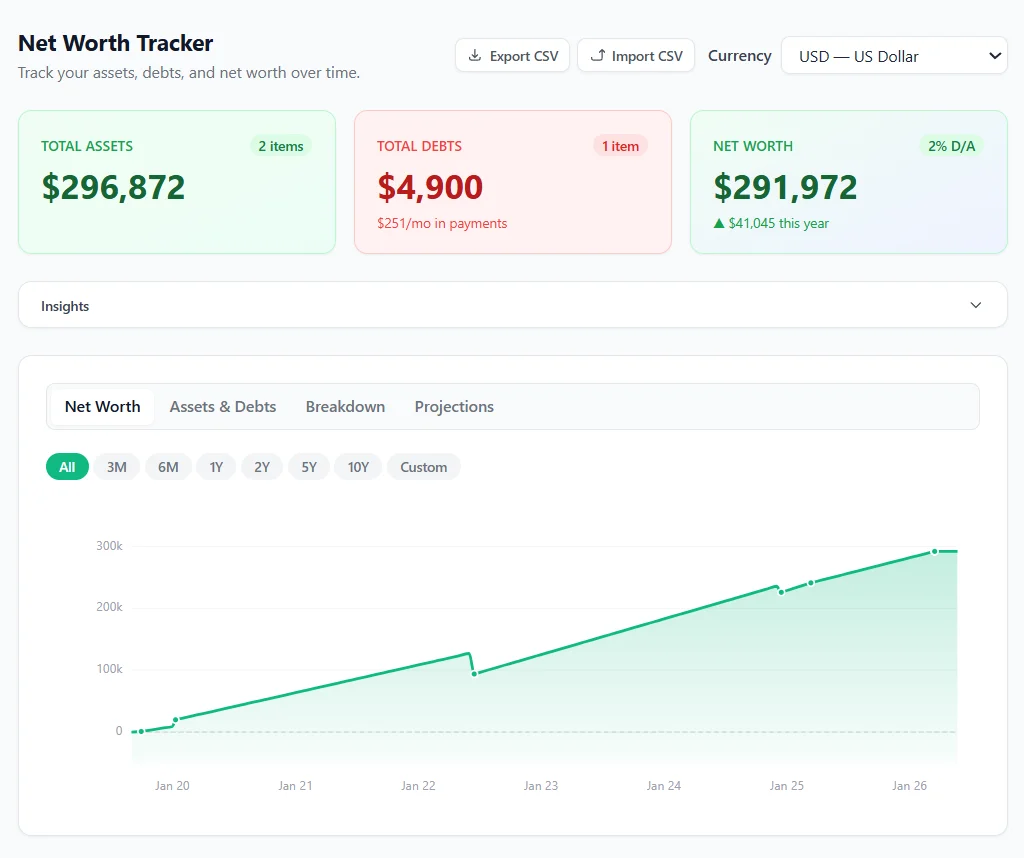
Update an existing item
Select an asset or debt card to edit it. Add a new Timeline entry for the current date and current value, then select Save. Regular monthly or quarterly updates make the trend chart more meaningful than replacing old entries.
Use the tabs above the chart to change the view:
- Net Worth shows the combined history.
- Assets & Debts compares the two totals over time.
- Breakdown shows which items make up the portfolio and debt balances.
- Projections estimates possible future values.
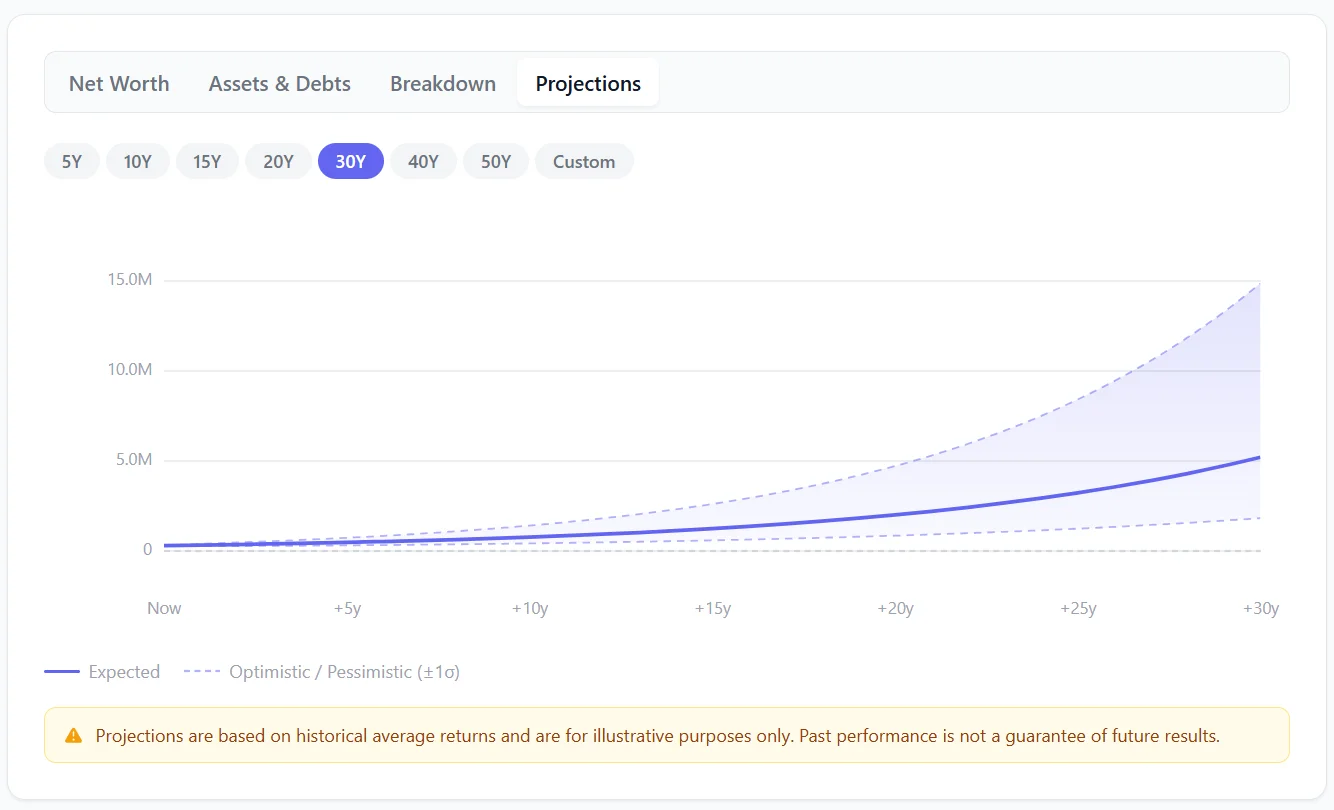
In Projections, choose the number of years to project. If you want planned deposits included, enable Savings Contributions and review the contribution settings. Projections use assumptions and historical averages; they are illustrations, not promises of future performance.
You can use Export CSV to keep a spreadsheet-compatible copy of supported tracker fields and Import CSV to merge compatible data into the tracker. Import does not replace or delete existing items. Follow Import and Export Net Worth Data before confirming a large import.
Build your monthly cash-flow plan
Open Tools in the dashboard and choose Cash Flow Tracker, or go directly to the standalone Cash Flow Tracker.
Add income
- Open the Income section and select Add Income.
- Name the stream, such as Primary Paycheck or Freelance Work.
- Choose Known Amount for regular income or Variable Amount for seasonal or irregular income.
- Enter the amount and correct frequency. The tracker converts weekly, bi-weekly, semi-monthly, monthly, quarterly, and annual values into a monthly amount.
- Select Add Income.
For variable income, add the applicable income periods and choose a margin of safety. The preview shows the conservative monthly amount that will be used in the plan.
Add expenses and savings
- Open Expenses and select Add Expense.
- Enter the expense name, amount, frequency, category, and budget tag shown in the form.
- Save recurring bills, subscriptions, and annual costs at their real frequency. The tracker normalizes them to a monthly reserve.
- Open the savings section and select Add Savings for contributions such as a 401(k), Roth IRA, HSA, emergency fund, or other investment.
Select an existing row to edit it. You can temporarily disable an item without deleting it, which is useful when comparing scenarios.
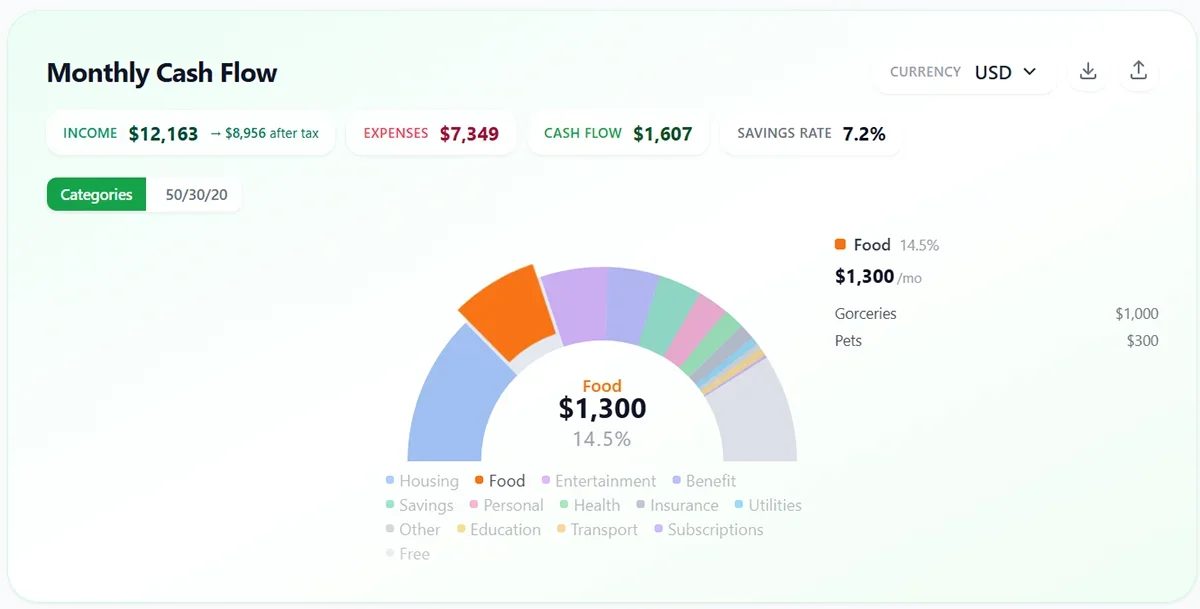
Read the budget views
- Categories shows where monthly spending goes.
- 50/30/20 compares needs, wants, and savings with the guideline shown in the chart.
- Debt Planner compares avalanche and snowball payoff approaches after you add balances, rates, and minimum payments.
- Tax Estimate can add an estimated tax adjustment when enabled. It is an estimate and does not replace a tax return or professional advice.
The top summary displays monthly Income, Expenses, and Cash Flow. A negative cash-flow value means planned outflows are greater than the income included in the tracker.
Changes are saved to your account automatically. Before leaving the page, allow any visible saving indicator to finish. Use the export action if you also want an offline JSON backup of your cash-flow data.
Keep the trackers useful
- Use realistic current balances rather than ideal targets.
- Update net worth on a consistent schedule, such as monthly.
- Record irregular annual expenses so the cash-flow plan reserves for them.
- Review both trackers after a major income, debt, or account change.
- Treat projections, tax estimates, and payoff dates as planning estimates.
For additional what-if planning, see Using the Financial Calculators. To turn a goal into a practical checklist, browse Financial Action Plans. For a tour of the rest of the member area, see Your Account and Dashboard.