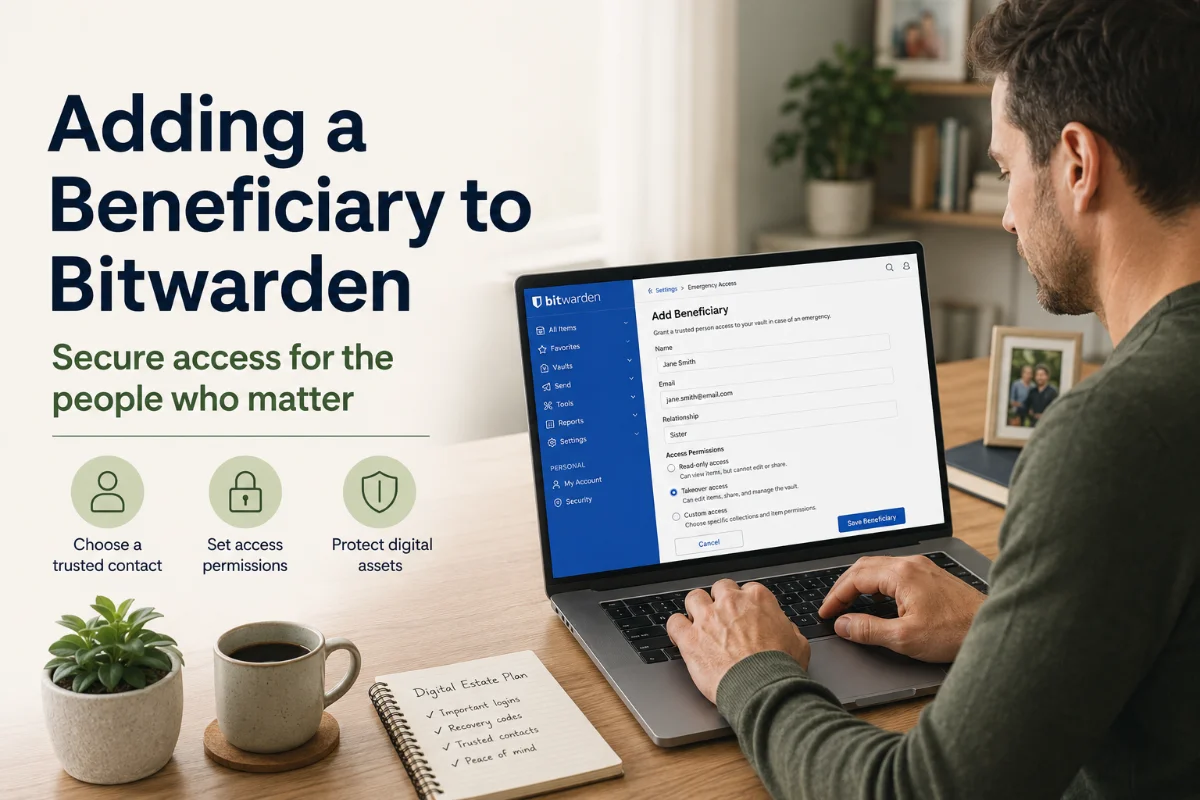
Most people have a will for their house, their car, and their savings account — but almost no one has a plan for the dozens of online accounts that make up their digital life. Email, bank logins, investment platforms, streaming services, and crypto wallets can all vanish into inaccessibility the moment you're gone. This guide gives you a concrete, step-by-step system using Bitwarden — a free, open-source password manager — to make sure the right people can access what they need, when they need it.
What Counts as a Digital Asset?
Before you can hand anything off, you need to know what you own. Digital assets fall into a few categories:
- Financial accounts: Online banking, brokerage accounts (Fidelity, Schwab, Vanguard), PayPal, Venmo, Cash App, and any crypto wallets or exchanges (Coinbase, Kraken).
- Income-generating accounts: Affiliate accounts, ad revenue platforms (Google AdSense, Amazon Associates), freelance platforms (Upwork, Fiverr), and any SaaS subscriptions tied to a business.
- Email and identity anchors: Your primary Gmail or Outlook account is the master key — it's used to reset almost every other password. It deserves special treatment.
- Subscription services: Netflix, Spotify, Amazon Prime, and software licenses that a surviving spouse or family member may need to manage or cancel.
- Social media and sentimental accounts: Facebook, Instagram, and iCloud (which can contain decades of photos) may need to be memorialized or closed.
- Crypto and NFTs: These are irretrievably lost without seed phrases or private keys. No customer support can recover them.
Why Bitwarden Is the Right Tool for This
Most estate planning guides say to "use a password manager" without telling you which one or how. Bitwarden stands out for two reasons that matter specifically for beneficiary planning:
- It's free and open-source. Your beneficiary doesn't need to pay a subscription to access your vault after you're gone.
- It has a built-in Emergency Access feature designed exactly for this purpose — letting a trusted person request access to your vault under controlled conditions, without you ever handing over your master password.
Setting Up Bitwarden Emergency Access (Step by Step)
Emergency Access is a free feature on Bitwarden's individual plan. Here's how to configure it so your beneficiary can access your passwords when the time comes:
Create Your Bitwarden Account
Go to bitwarden.com and create a free account. Use a strong, memorable master password — this is the one password you'll need to store separately (more on that below). Enable two-factor authentication using an authenticator app like Authy.
Migrate All Your Passwords Into Bitwarden
Import passwords from your browser or existing password manager. Then, for every important account, add a note in Bitwarden with context your beneficiary will need: the account purpose, the registered email address, any security question answers, and any recovery codes. Treat your Bitwarden vault as a complete digital handoff document — not just a list of passwords.
Add Your Beneficiary as an Emergency Contact
In Bitwarden, go to Settings → Emergency Access → Invite Emergency Contact. Enter your beneficiary's email address. Choose one of two access levels:
- View: The contact can see all items in your vault but cannot change anything. Best for a surviving spouse who just needs to log in to accounts.
- Takeover: The contact can reset your master password and fully take over the vault. Best for an executor who needs to close, transfer, or manage accounts.
Set a waiting period — 7, 14, or 30 days. This is a safety window: if your contact requests access while you're alive (or if there's an error), you get notified and can reject the request before they gain access. After the waiting period expires with no rejection, access is granted automatically.
Your Beneficiary Accepts the Invitation
Your contact will receive an email from Bitwarden. They need to create a free Bitwarden account (if they don't already have one) and accept the invitation. Once accepted, the trust relationship is established — they can request access at any time in the future.
Store Your Master Password Safely Offline
Bitwarden Emergency Access does not require your master password — but your beneficiary may eventually need it for full vault control. Write your master password on paper, seal it in an envelope, and store it with your will, in a fireproof safe, or in a safety deposit box. Do not store it digitally where it could be compromised. Inform your executor or estate attorney where this envelope is located.

What Your Beneficiary Does When the Time Comes
When your beneficiary needs access to your vault, they log into their own Bitwarden account, navigate to Emergency Access, and click Request Access. The waiting period begins. If no rejection comes from your account during that window, Bitwarden grants them the access level you designated. They can then view or take over the vault — logging into your financial accounts, canceling subscriptions, recovering crypto, or doing whatever is needed.
Handling Crypto Separately
Bitwarden can store crypto exchange passwords, but it cannot store hardware wallet seed phrases safely enough for long-term estate planning. For crypto:
- Write your seed phrase on paper (never digitally) and store it in a fireproof safe or safety deposit box — separate from your Bitwarden master password envelope.
- Add a note in Bitwarden describing where the seed phrase is stored, without including the phrase itself.
- Consider a metal seed phrase backup (products like Cryptosteel or Bilodal) if the holdings are significant.

What to Include in Your Bitwarden Vault
Organize your vault so your beneficiary can navigate it quickly under stress. Create folders for each category:
- Financial: Banks, brokerages, retirement accounts, crypto exchanges
- Insurance: Life, health, auto, home — with policy numbers in the notes field
- Email & Identity: Primary email, backup email, Apple ID, Google account
- Subscriptions: Any recurring billing they'll need to cancel or transfer
- Government & Legal: IRS account, Social Security portal, state DMV online account
- Business: Any income-generating accounts, domain registrars, hosting providers
Updating Your Estate Plan and Will
Bitwarden handles the technical handoff of credentials, but your legal documents need to reflect your wishes for what to do with those assets. Update your will to explicitly mention digital assets and name your digital executor (which can be the same person as your Bitwarden emergency contact). Some states have adopted the Revised Uniform Fiduciary Access to Digital Assets Act (RUFADAA), which gives executors legal authority over digital accounts — but only if your will explicitly grants it.
If you have significant assets in crypto, business platforms, or revenue-generating accounts, consult an estate attorney to ensure your executor has the legal authority to act — not just the technical access.
Review Annually
Set a reminder each year — tax season works well — to do a 15-minute review of your Bitwarden vault and emergency access setup. Add any new accounts, remove closed ones, and confirm your beneficiary's contact information is still current. A vault that's two years out of date is only slightly better than no vault at all.
Getting this right takes about an afternoon. The alternative is leaving your family to spend months fighting with customer support teams, probate courts, and platform terms of service while grieving. Bitwarden Emergency Access turns that nightmare into a clean, private handoff — on your terms.